

 LinkedIn
The artefact: a $149 ‘all-inclusive’ pricing card
$149 a month, all-inclusive. Then you connect a second account, use up your generation credits, raise your ad spend, and discover you still need someone to approve the work. I’m taking apart a typical AI ads pricing card: the three-column SaaS table with a bold $149 plan, green checks for automated bidding and ad copy, and small-print limits underneath. I chose it because it captures the question buyers actually face. Does the fee cover campaign management, or just access to software that helps somebody else manage campaigns?
This is an illustrative card, not a quotation from one vendor’s checkout page. The prices and limits below form a model for reading the claim, not a bill you should expect from any particular product. That distinction matters: vendors package these limits differently. The pattern is what deserves scrutiny. ‘All-inclusive’ can describe the feature list while excluding the capacity and labor needed to use it.
I’ll read the card in the order a buyer encounters it: the headline, the account footnote, the generation allowance, the spend threshold, and finally the bill those terms can produce. The question at every line is the same: what happens when the account needs something beyond the base plan?
Line one: the $149 headline buys access. Does it buy execution?
At the top, the card sells predictability. For $149 a month, the buyer sees optimization tools, reporting dashboards, and alerts. Against a hypothetical $20,000 monthly Google Ads budget, that fee looks small. It is easy to read the green checks for bidding, ad copy, and negative keywords as a promise that the platform will handle those jobs.
Here is where I would stop reading the checks and ask for verbs. Does the software change a bid, add a negative keyword, and deploy revised copy? Or does it identify an opportunity and ask a person to act? Both can be useful. They are not the same service.
In the advisory version of this card, the platform connects to an ad account, reads historical data, and builds a recommendation queue. It might flag search lost IS (budget) at 42%, or show that a broad-match term spent $600 without a conversion over seven days. A media buyer still has to check the logic and approve the change. The subscription has not replaced that person’s work; it has given that person another interface.
That is the double payment I raised in my look at Google Ads agency pricing in 2026: software can be inexpensive on its own and expensive once you count the human hours needed to interpret and apply its advice. Verdict on the headline: $149 is a clear access price, but it tells you nothing about who executes the recommendations.
Line two: one account and one domain are not every account and domain
Next comes the first asterisk: *Base subscription includes 1 connected ad account and 1 primary domain.* For a brand with one site and one Google Ads account, that may be enough. For an agency managing several clients, it is a boundary around the headline price. A separate account for a sub-brand or another client can become another monthly line item; a second domain may need its own allowance too.
Suppose the add-on on this illustrative card is $79 per additional account. Ten client accounts cost $149 plus nine add-ons at $79 each: $860 a month, before anyone acts on an alert. The software has not changed, but the buyer’s use of it has moved well beyond the advertised seat. That is the point of the footnote.

Paid search is not the only place to check scope. Teams evaluating flat-rate AEO pricing per domain also need to know how a vendor counts regional sites and tracked domains. Do not assume that a landing page, subdomain, staging URL, or regional variation is either included or separately billable. Ask which one it is. Verdict on the account footnote: the base fee may suit a single-account buyer; it is not a reliable agency budget until the vendor defines what counts as an account and a domain.
Line three: ‘ad creation’ has a monthly counter
The feature row promises generated ad assets and keyword discovery. Under it, the illustrative card allows 200 generative ad credits or 500 keyword-cluster queries per billing cycle. That sounds roomy until a team works across a catalog, drafts several angles, and revises the assets. A brand with 40 product categories does not need a particularly ambitious Tuesday to start watching the counter.
What happens at zero is more important than the word generative on the card. In this model, more capacity means a $49 pack of 250 additional generations or an upgrade to a higher tier. The vendor is selling a base allowance, not unlimited production. That can be a perfectly workable deal if the buyer knows the allowance and the overage price before building a workflow around it.
The language often blurs access to a feature with unlimited use of a feature. I have made that mistake reading software tables, and it is easy to see why: a green check answers whether the button exists, not how often you can press it. Verdict on the generation row: price the volume you expect to use, not the existence of the button.
Line four: the spend threshold follows your budget upward
The last asterisk on the card sets an entry-plan ceiling of $10,000 in monthly ad spend. The buyer’s own budget can therefore move the software bill. Optmyzr’s pricing page is one place to examine how a real vendor presents its plans and billing terms; the $10,000 ceiling and charges in this illustrative card are not a quotation of Optmyzr’s rates.
Say an advertiser moves from $9,500 to $22,000 in spend during a seasonal push. Under a tiered plan, that can put the account above the entry allowance even though the buyer has not asked for another feature. On this card, the increase appears as a higher subscription tier or an overage tied to spend. The example costs in the table below allow $100 to $240 a month for that change. Another contract could price it differently. The mechanism to watch is the same: growth in media spend changes the software price.

I understand why vendors price around account size. I do not accept calling a plan flat without making its spend boundary hard to miss. A buyer forecasting a promotion should be able to calculate the subscription bill alongside the media budget, not discover the threshold after the campaign runs. Verdict on the spend asterisk: the monthly fee is predictable only inside its stated spend tier.
The bill: recurring charges, one-off work, and the hours no vendor invoices
Here is the cost breakdown for the illustrative card at $20,000 in monthly search spend. With the selected add-ons and review time, the model comes to $626–$1,334 a month in recurring costs, versus the $149 headline. Initial configuration adds $0–$500 once, making the first month $626–$1,834. The recurring range is $7,512–$16,008 over twelve months, before any one-off setup work.
These are scenario figures, not a bundle quoted by one vendor. The linked pricing pages show where to inspect actual products; they should not be read as sources for every charge in this model. In particular, the optional tracking module is an example of a separately priced item, not a necessary part of every AI ads stack.
| Expense | Timing | Monthly amount in this model | Basis for the figure |
|---|---|---|---|
| Base software | Listed, recurring | $149 | Illustrative card headline; compare actual plan terms on Adalysis’s pricing page |
| Spend-tier increase | Additional, recurring | $100–$240 | Illustrative overage range; check the vendor’s spend thresholds and billing terms |
| Additional account or domain | Additional, recurring | $79–$158 | Illustrative add-on allowance for one or two extra units; confirm how the vendor counts each unit |
| Generation packs | Additional, recurring | $49–$98 | One or two illustrative $49 packs of 250 generations |
| Optional tracking module | Separately listed, recurring | $49 | Illustrative module allowance; Madgicx lists Tracking Pro separately, so check the current charge and whether you need it |
| Human review and execution | Unbilled by the tool, recurring | $200–$640 | 4–8 operator hours at an illustrative $50–$80 an hour |
| Initial rule calibration | One-off | $0–$500 | Illustrative internal setup allowance, not a recurring subscription fee |
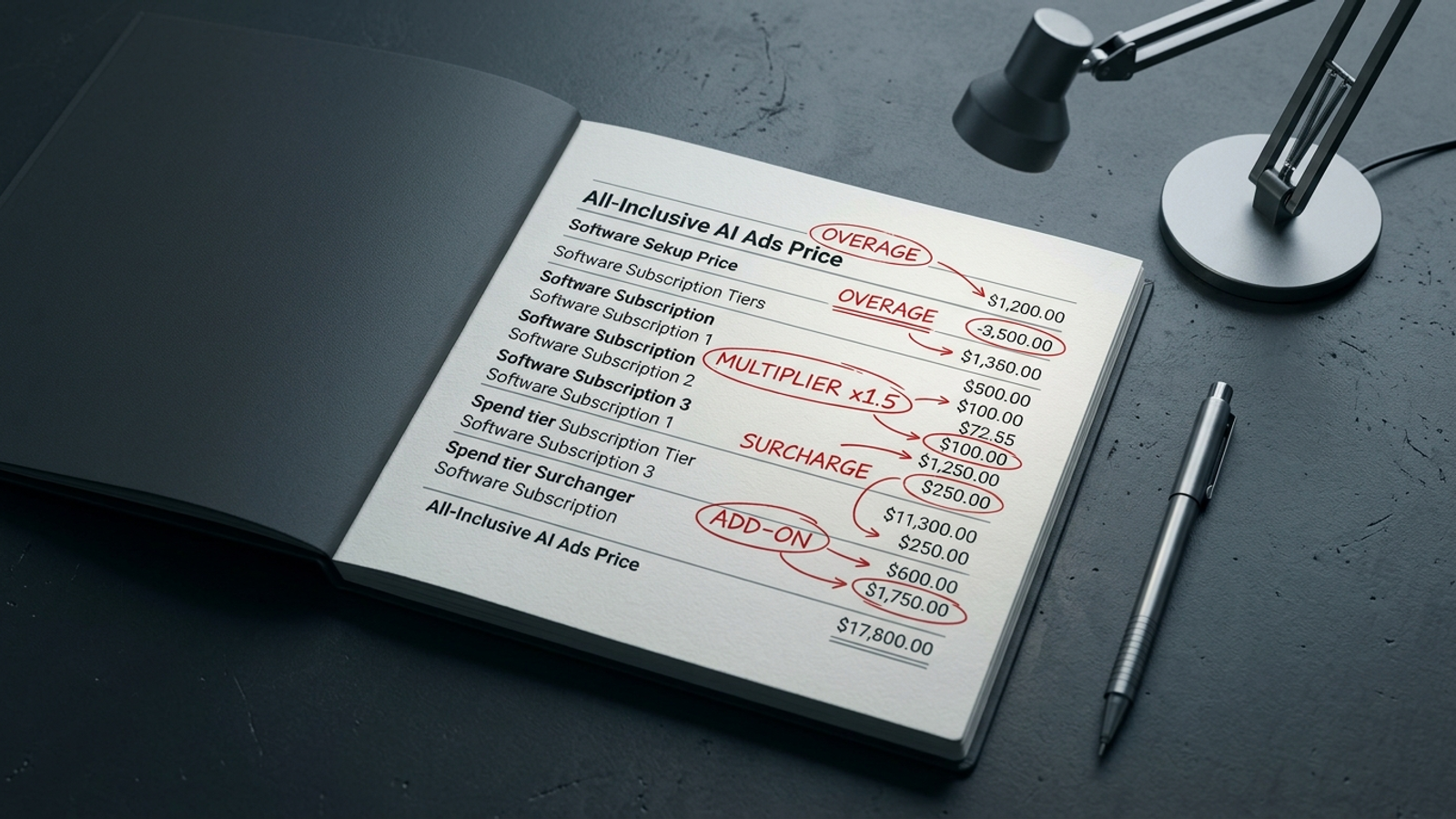
The recurring low end adds the base fee, the lower add-on amounts, the optional module, and $200 in operator time. The high end uses the upper amounts and $640 in operator time. The $500 setup allowance belongs only in the first-month high end. Mixing it into every monthly bill would make the comparison look more dramatic and less useful.
That last recurring row is the one a pricing page cannot settle for you. If an alert needs a person to inspect it, decide whether it makes sense, and push the change, that person’s time remains in the operating cost. I made a similar distinction in the breakdown of agency retainers versus DIY stacks at $20k spend. A low subscription fee does not erase work that the product leaves on your desk.
The cheapest mistake in this model is buying a $49 generation pack because you planned around an allowance you had not checked. The most expensive mistake is treating an advisory dashboard as an autonomous operator, then letting recommendations wait while a $20,000 media budget keeps running. Neither mistake is fixed by a prettier pricing table.
What the card gets right, and the four answers I would demand
I would not throw out the software because the word all-inclusive overreaches. A consolidated reporting view, Quality Score data across many ad groups, and timely anomaly alerts can be useful. If your team wants better diagnostics and already has someone to make decisions and changes, the access fee may be easy to justify. The problem starts when a diagnostic tool is sold as a replacement for campaign management.
Before I put a card like this into an operating budget, I want four answers in writing:
- How does spend change the invoice? Give me the threshold, the period used to measure it, what happens when I cross it, and whether the price falls again when spend does.
- How are accounts and domains counted? Tell me what happens with additional client accounts, regional sites, subdomains, and landing page domains. Show the charge for each unit I actually need.
- What happens when the allowance runs out? Specify the caps for generated assets and queries, the price of another pack, and whether work stops or triggers an automatic upgrade.
- Who makes the change? Separate alerts and recommendations from bid changes, negative-keyword additions, copy tests, and budget reallocations. Tell me which actions the software performs and which still require my team.
The fourth answer decides whether I am buying assistance or handing off execution. A tool that builds a checklist leaves the media buyer’s job intact. That is why the comparison with groas matters: groas pairs one flat fee for a 90-day sprint, paid once up front, with continuous machine execution, while a named human strategist sets direction, guardrails, and accountability. Its proposition is not another queue of suggestions for a client to process. It is the work getting done inside those guardrails.
I would still ask any provider to put the actual scope and fee in writing. The point of this teardown is not to replace one slogan with another. It is to make the bill and the division of labor legible before either becomes your problem.
Overall verdict: keep the checks, read the asterisks
The card earns credit for making its base access price easy to see. I would keep the feature checklist too, but only as a starting inventory of what the software can do. It cannot tell me how many accounts the price covers, how long the generation allowance lasts, what a budget increase does to the bill, or who takes action when an alert appears. The asterisks carry those answers.
If you choose a software stack, budget its account add-ons, generation packs, spend tier, and operator time from day one. If you want an operational replacement, insist on execution within agreed guardrails and a person accountable for the outcome. ‘All-inclusive’ does not survive on a green checkmark. It has to survive the first extra account, the first exhausted allowance, and the first Monday when nobody has time to clear the recommendation queue. Otherwise, the real service is still waiting in the fine print at the bottom of the page.